What is an App Clip on iPhone, and why did a QR code open one?
Updated 18 November 2026
An App Clip is a small part of an iPhone app that opens instantly, without a download, when you scan a QR code or App Clip Code, tap an NFC tag, or tap a link. It does one job, like paying for parking or joining an event, can't reach your contacts or photos library, and iOS removes it after a while unused.
What an App Clip is
Apple describes an App Clip as "a small part of an app" for doing a task quickly: renting a bike, paying for parking, ordering food. Instead of finding the app in the App Store, installing it and making an account, you scan or tap something and that one part of the app opens straight away.
Your iPhone first shows a card with the app's name, a picture and a button that says Open, View or Play. Tap the button and you're in.
App Clips are Apple's, so they only open on iPhone and iPad. Services that use them need another way in for Android phones, often a web page.
Where App Clips come from
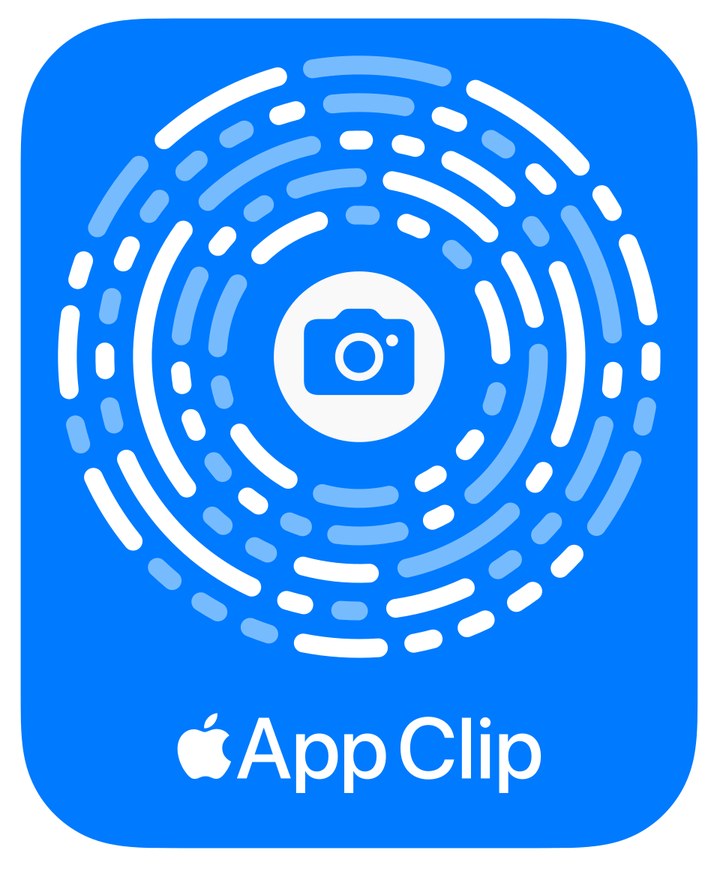
According to Apple's iPhone User Guide, an App Clip can start from:
- A QR code, scanned with the iPhone camera or the Code Scanner in Control Center. If yours won't read one, here's why an iPhone camera isn't scanning a QR code. If the code scans but the App Clip won't start, see App Clip not opening from a QR code.
- An App Clip Code, Apple's own round code with rings of dashes. One with a camera in the middle is for scanning; one with a phone in the middle also has an NFC tag you can tap.
- An NFC tag, by holding the top of your iPhone near it.
- A link in Safari or Messages, or on a place's card in Maps.
Apple's examples are things you do once, somewhere specific: a bike rental, a coffee order, a food truck's poster, paying at a restaurant table, audio commentary from a museum label. Some App Clips are demos instead, such as a game's first level.
What an App Clip can and can't do
App Clips are deliberately limited. From Apple's developer documentation:
- It can't read your personal data. App Clips can't access data from Contacts, Calendar, Files, Health, Messages, Reminders or Photos, or your Apple Music library or motion and fitness data.
- It can't follow you around. An App Clip can't ask to track you across other apps and websites, and can't share data with any app except its own full app.
- It can't keep your location. It can ask for your location only while you're using it, and that permission resets automatically at 4am the next day.
- It can't run in the background.
- It can only notify you briefly. Notifications are allowed for up to 8 hours after you open it, unless you give it permission for longer.
- It's small. One opened from a code can be at most 25 MB on the newest iOS, less on older versions. Most full apps are many times bigger.
Apple's guidelines also tell developers not to make you create an account before an App Clip is useful, and not to use App Clips to show ads. Where payment or sign-in is needed, supported App Clips can use Apple Pay and Sign in with Apple, so you don't type card details or make a new password.
Is it safe to open one?
An App Clip is part of an app from the App Store, with all the limits above, so it's a lot more contained than downloading an unfamiliar app. The card tells you which app it belongs to, and you can visit that app's App Store page from the card or from the banner at the top of the App Clip before you do anything.
The usual care with codes still applies. A QR code can also just open a website, and anyone can print a sticker. If a code on a parking meter or a menu looks stuck on top of another one, or asks for card details in a web page rather than through Apple Pay, stop and pay another way.
How long it stays, and how to remove it
App Clips don't appear on your Home Screen, and you don't have to manage them. Apple says iOS removes an App Clip after a period of inactivity, along with its data. If you install the full app, it replaces the App Clip.
To find or remove one yourself on iOS 27:
- Swipe left past your last Home Screen page to open the App Library.
- Tap the search field at the top and scroll to the bottom of the list, where App Clips are listed, or type the App Clip's name.
- Touch and hold the App Clip, then tap Remove App Clip.
Older guides mention Settings > App Clips. That was the iOS 14 route; Apple's current guide uses the App Library.
Want to try it? SEENCAM gives your guests one QR code. They shoot from their own phones with no app to download, and every photo develops together when the roll opens. Free for up to 10 guests.
Get SEENCAM on the App StoreWhy your wedding or party QR code opened one
Event apps use App Clips because guests won't install an app at a reception. SEENCAM is one of them: it's a shared disposable camera for weddings and parties. The host starts a roll in the iPhone app and puts one QR code on the tables. When a guest scans it on an iPhone, the camera opens as an App Clip, so they can start shooting straight into the roll with no download and no account. On Android and other phones, the same code opens the camera in the browser, so mixed iPhone and Android groups all join the same way.
The host chooses how many shots each guest gets and when the photos appear: during the party, when it ends, or 12 or 24 hours later. Every roll is free for up to 10 guests, and guests never pay.
Quick answers
- Did I just install an app? No. You opened a small part of one. It won't appear on your Home Screen, and iOS removes it after a while unused.
- Can it see my photos? It can't access your Photos library. If an App Clip uses the camera, it asks permission first, as any app does.
- Will it keep sending me notifications? Only for up to 8 hours, unless you allow longer.
- Does it work on Android? App Clips don't. Services that use them need another way in for Android, often a web page.
- How do I get rid of it? App Library, search, scroll to App Clips, touch and hold, Remove App Clip.
Sources
- Use App Clips on iPhone, Apple, iPhone User Guide
- Choosing the right functionality for your App Clip, Apple Developer Documentation
- App Clips, Apple Human Interface Guidelines
Related guides
See an App Clip at work
Start a SEENCAM roll on your iPhone and share the QR code with a friend. On their iPhone the camera opens as an App Clip, with nothing to install. Free for up to 10 guests.
Get SEENCAM on the App Store