How to use a disposable camera: wind, flash, shoot, finish
Updated 23 November 2026
Turn the dial with your thumb until it stops, switch the flash on for anything indoors, frame the shot through the little window from 1 to 3 metres (3 to 10 feet) away, and press the shutter. Repeat until the counter reads 0, then take the whole camera to a lab without opening it.
Step by step
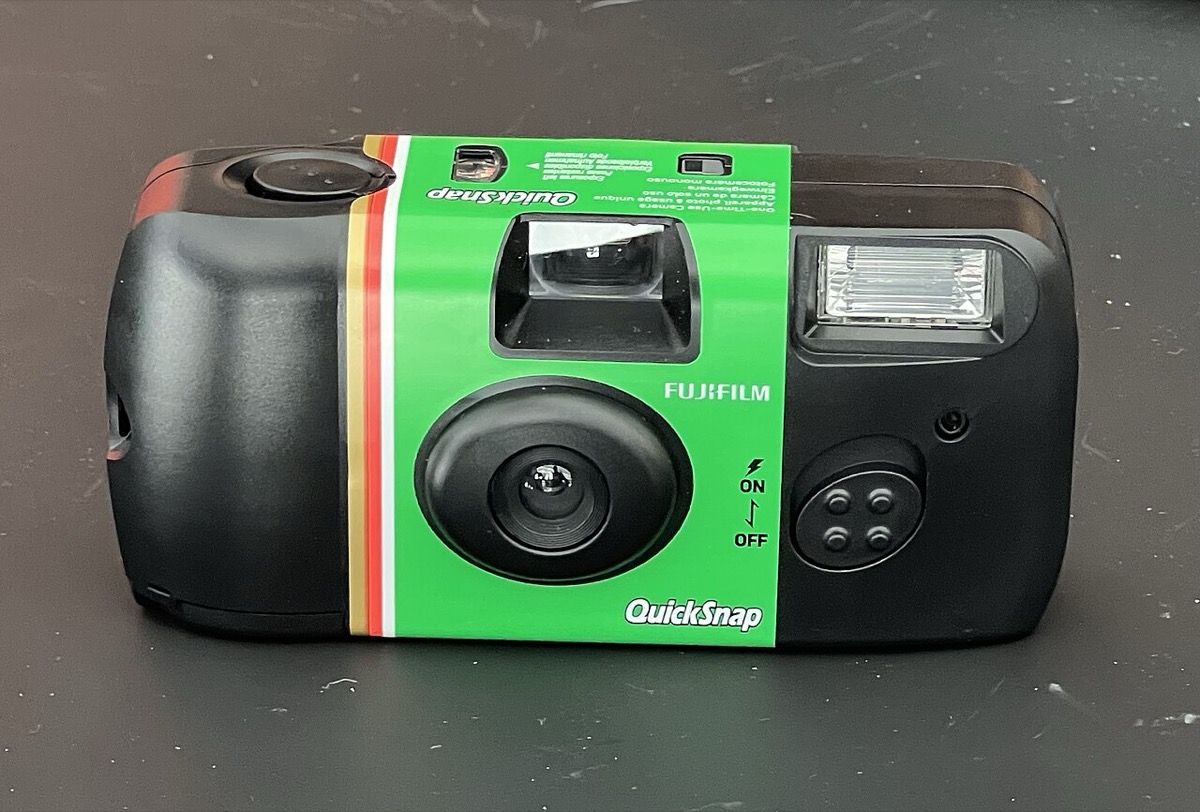
Fujifilm sums up its QuickSnap in four steps: turn the flash on, advance the dial, check the viewfinder and shoot, then return it for processing. Kodak's cameras work the same way. There's nothing to charge or load first, because the battery and the film are already inside.
- Check which camera you have. Most disposables have a flash, but some don't. Kodak's Daylight and Sport cameras have no flash and are made for outdoors only.
- Wind the film. Turn the thumb dial on the top until it stops. That moves a fresh frame behind the lens. Do it after every photo, so the camera is ready for the next one.
- Turn the flash on for anything indoors, in shade or after sunset. On a Fujifilm QuickSnap it's the switch on the front. On a Kodak FunSaver, Kodak says the flash must be charged before every picture: press the flash button and wait for the ready light on top.
- Frame through the viewfinder, the small window above the lens. Stand back far enough: Fujifilm's lens focuses from 1 metre, so anyone closer comes out soft.
- Hold still and press the shutter. Keep your fingers away from the lens and the flash window, which sit close together on the front.
- Watch the counter. Each photo moves the number down by one. A standard QuickSnap or FunSaver has 27 shots.
Flash, distance and light: the settings you can't change
A disposable has one lens, one shutter speed and one film, so the only things you control are the flash and where you stand. These are the makers' own figures:
| Camera | Film | Sharp from | Flash reach | Flash |
|---|---|---|---|---|
| Fujifilm QuickSnap | ISO 400 | 1 m (3 ft) | 1 to 3 m (3 to 10 ft) | Switch on the front |
| Kodak FunSaver | ISO 800 | Not stated | 1.2 to 3.5 m (4 to 11.5 ft) | Charge before every picture |
| Kodak Power Flash | ISO 800 | Not stated | 1.2 to 4.5 m (4 to 14.5 ft) | Recharges automatically |
| Kodak Daylight, Kodak Sport | ISO 800 | Not stated | None | Outdoors only |
Figures are from Fujifilm's and Kodak's product pages, read in November 2026. The QuickSnap shoots at 1/140 of a second at f/10, and Digital Camera World measured the FunSaver at 1/100 at f/10. That's plenty for daylight. Indoors, the flash does all the work, which is why its reach matters more than anything else on the camera.
So the sweet spot is about one to three big steps from the people you're photographing: far enough to be sharp and not wash out faces, close enough for the flash to reach them.
The mistakes that ruin most shots
- Flash off indoors. Analogue Wonderland, a UK film lab, says underexposed photos are one of the most common problems it sees from disposables, especially at weddings and parties. Its advice: indoors or in low light, always use the flash.
- Shooting before the flash is ready. On a camera you charge by hand, the ready light has to come on first, every time.
- Too far away. The dance floor from your table, or the speeches from the back of the room, are beyond any disposable's flash. The people come out dark and the room comes out black.
- Too close. Closer than 1 metre and the photo is soft, and Analogue Wonderland warns that flash too close to a face washes it out. Arm's-length selfies often fall into this.
- Bright light behind the people. A window, sunset or lit stage behind them leaves their faces in shadow. Rewind Photo Lab lists strong backlighting as a common cause of dark frames.
- A finger over the lens or flash. You won't see it in the viewfinder, which sits apart from the lens. You'll only find out when the photos come back.
If a roll has already come back dark, here's why disposable photos come out dark and what a lab can still fix.
How to tell it's finished
The counter reaches 0. On Fujifilm's cameras, the dial also stops catching when you turn it: Fujifilm's Japanese product page says the roll is finished when the counter reads 0 and the winding dial no longer stops.
- Don't open it. The film inside hasn't been developed yet, and light would spoil it. The camera itself goes to the lab.
- Develop it soon. Analogue Wonderland notes that film can lose quality if it's left undeveloped for too long. Our guide covers where to get a disposable camera developed.
- The body gets a second life. Fujifilm says it reuses or recycles up to 60% of the components, by weight, of the QuickSnap cameras that photo labs send back after developing.
Kept a camera in a drawer for years? Check whether disposable cameras expire before you use it.
Want to try it? SEENCAM gives your guests one QR code. They shoot from their own phones with no app to download, and every photo develops together when the roll opens. Free for up to 10 guests.
Get SEENCAM on the App StoreHanding disposable cameras to guests
At a wedding or party, most guests pick up a disposable without reading anything. A small label does more than any speech. Analogue Wonderland suggests a sticker with simple instructions, such as making sure the flash is on and advancing the film first, and says some hosts tape the flash switch on so it stays on.
Wording you can copy for a card next to each camera:
Wind the dial until it stops. Flash on. Stand two big steps back. Take a few, then pass it to the next person. Leave the camera on the table when you go.
Planning cameras for the tables? Here's how many disposable cameras you need for a wedding, and an honest look at whether they're worth it.
How SEENCAM does it
SEENCAM is a disposable camera on your guests' own phones. You start a roll in the iPhone app and put one QR code on the tables. Guests scan it and shoot, with no app to download and no account: the camera opens as an App Clip on iPhone and in the browser on any other phone. Nobody needs to learn a dial, a flash button or a counter.
It keeps the parts people love about a disposable. You choose how many shots each guest gets and when shooting stops, nobody sees the photos until the time you choose (during the event, when it ends, or 12 or 24 hours later), and guests pick from eight film looks, seeing the look live before they shoot. There are no cameras to collect and no rolls to develop.
Every roll is free for up to 10 guests. A bigger party is a one-time purchase for that roll, with no subscription, and guests never pay.
Sources
- QuickSnap, Fujifilm (United States)
- QuickSnap Specifications, Fujifilm (United States)
- Single-Use Cameras, Kodak Professional
- 10 tips for capturing amazing photos with disposable cameras, Analogue Wonderland
- QuickSnap Reuse & Recycle Program, Fujifilm (United States)
Related guides
Skip the dial and the developing
Start a roll on your iPhone and put one QR code on the tables. Guests shoot on their own phones in real film looks, and every photo develops together when you choose. Free for up to 10 guests.
Get SEENCAM on the App Store